Importing librarys
import matplotlib.pyplot as plt
import pandas as pd
import plotly.express as px
import seaborn as snsThis project encompassed both collaborative and individual components. As a team, we developed a product concept and identified a dataset relevant to our idea. The task involved pitching our application, designed specifically for students, focusing on finance, innovation, and enterprise. Our pitch was presented as a video, which I’ve embedded on the first page of the PDF above containing my individual report.
Individually, we were responsible for diving deeper into the technical side of our pitch. This included conducting data analysis, identifying the market gap, understanding target customers, and outlining a strategic approach to product sales. While teamwork was encouraged, each member was expected to make a unique and meaningful contribution in their final report.
Below are key snippets of code I developed during the data analysis phase, which played a critical role in shaping our product’s direction. I led this part of the project, as it closely aligned with my strengths. Using a preliminary dataset, I informed our pricing strategy, while an Uber Analysis Dataset enabled me to identify market gaps and opportunities. Below, I’ve included snippets from the latter dataset to demonstrate its role in our decision-making process.
import matplotlib.pyplot as plt
import pandas as pd
import plotly.express as px
import seaborn as snsdf = pd.read_csv("UberDataset.csv")
df.head()| START_DATE | END_DATE | CATEGORY | START | STOP | MILES | PURPOSE | |
|---|---|---|---|---|---|---|---|
| 0 | 01/01/2016 21:11 | 01/01/2016 21:17 | Business | Fort Pierce | Fort Pierce | 5.1 | Meal/Entertain |
| 1 | 01/02/2016 01:25 | 01/02/2016 01:37 | Business | Fort Pierce | Fort Pierce | 5.0 | NaN |
| 2 | 01/02/2016 20:25 | 01/02/2016 20:38 | Business | Fort Pierce | Fort Pierce | 4.8 | Errand/Supplies |
| 3 | 01/05/2016 17:31 | 01/05/2016 17:45 | Business | Fort Pierce | Fort Pierce | 4.7 | Meeting |
| 4 | 01/06/2016 14:42 | 01/06/2016 15:49 | Business | Fort Pierce | West Palm Beach | 63.7 | Customer Visit |
df.info()<class 'pandas.core.frame.DataFrame'>
RangeIndex: 1155 entries, 0 to 1154
Data columns (total 7 columns):
# Column Non-Null Count Dtype
--- ------ -------------- -----
0 START_DATE 1155 non-null object
1 END_DATE 1155 non-null object
2 CATEGORY 1155 non-null object
3 START 1155 non-null object
4 STOP 1155 non-null object
5 MILES 1155 non-null float64
6 PURPOSE 653 non-null object
dtypes: float64(1), object(6)
memory usage: 63.3+ KBdf.columns = df.columns.str.lower()
df.head()| start_date | end_date | category | start | stop | miles | purpose | |
|---|---|---|---|---|---|---|---|
| 0 | 01/01/2016 21:11 | 01/01/2016 21:17 | Business | Fort Pierce | Fort Pierce | 5.1 | Meal/Entertain |
| 1 | 01/02/2016 01:25 | 01/02/2016 01:37 | Business | Fort Pierce | Fort Pierce | 5.0 | NaN |
| 2 | 01/02/2016 20:25 | 01/02/2016 20:38 | Business | Fort Pierce | Fort Pierce | 4.8 | Errand/Supplies |
| 3 | 01/05/2016 17:31 | 01/05/2016 17:45 | Business | Fort Pierce | Fort Pierce | 4.7 | Meeting |
| 4 | 01/06/2016 14:42 | 01/06/2016 15:49 | Business | Fort Pierce | West Palm Beach | 63.7 | Customer Visit |
df.isnull().sum()
#no missing values found
start_date 0
end_date 0
category 0
start 0
stop 0
miles 0
purpose 502
dtype: int64df.describe()| miles | |
|---|---|
| count | 1155.000000 |
| mean | 10.566840 |
| std | 21.579106 |
| min | 0.500000 |
| 25% | 2.900000 |
| 50% | 6.000000 |
| 75% | 10.400000 |
| max | 310.300000 |
duplicated_data = df[df.duplicated()]
print(duplicated_data.shape)

df = df.drop_duplicates(keep='first')
(1, 7)data_encoded = pd.get_dummies(df, columns=['category', 'purpose'], drop_first=True)df["start_date"] = pd.to_datetime(df["start_date"], errors="coerce")
df["end_date"] = pd.to_datetime(df["end_date"], errors="coerce")# Handle missing values by dropping rows with missing 'start' or 'stop' and filling 'purpose' with 'unknown'
df.dropna(subset=['start', 'stop'], inplace=True)
df['purpose'] = df['purpose'].fillna("Unknown") df["date"] = df["start_date"].dt.datedf = df.sort_values('start_date')
df.set_index('start_date', inplace=True)df.head()| end_date | category | start | stop | miles | purpose | date | |
|---|---|---|---|---|---|---|---|
| start_date | |||||||
| 2016-01-01 21:11:00 | 2016-01-01 21:17:00 | Business | Fort Pierce | Fort Pierce | 5.1 | Meal/Entertain | 2016-01-01 |
| 2016-01-02 01:25:00 | 2016-01-02 01:37:00 | Business | Fort Pierce | Fort Pierce | 5.0 | Unknown | 2016-01-02 |
| 2016-01-02 20:25:00 | 2016-01-02 20:38:00 | Business | Fort Pierce | Fort Pierce | 4.8 | Errand/Supplies | 2016-01-02 |
| 2016-01-05 17:31:00 | 2016-01-05 17:45:00 | Business | Fort Pierce | Fort Pierce | 4.7 | Meeting | 2016-01-05 |
| 2016-01-06 14:42:00 | 2016-01-06 15:49:00 | Business | Fort Pierce | West Palm Beach | 63.7 | Customer Visit | 2016-01-06 |
plt.figure(figsize=(11, 7))
sns.lineplot(x=df["date"].value_counts().sort_index().index,
             y=df["date"].value_counts().sort_index().values, marker="o")
plt.xlabel("date")
plt.ylabel("Number of Trips")
plt.title("Uber Trips Over Time")
plt.xticks(rotation=45)
plt.show()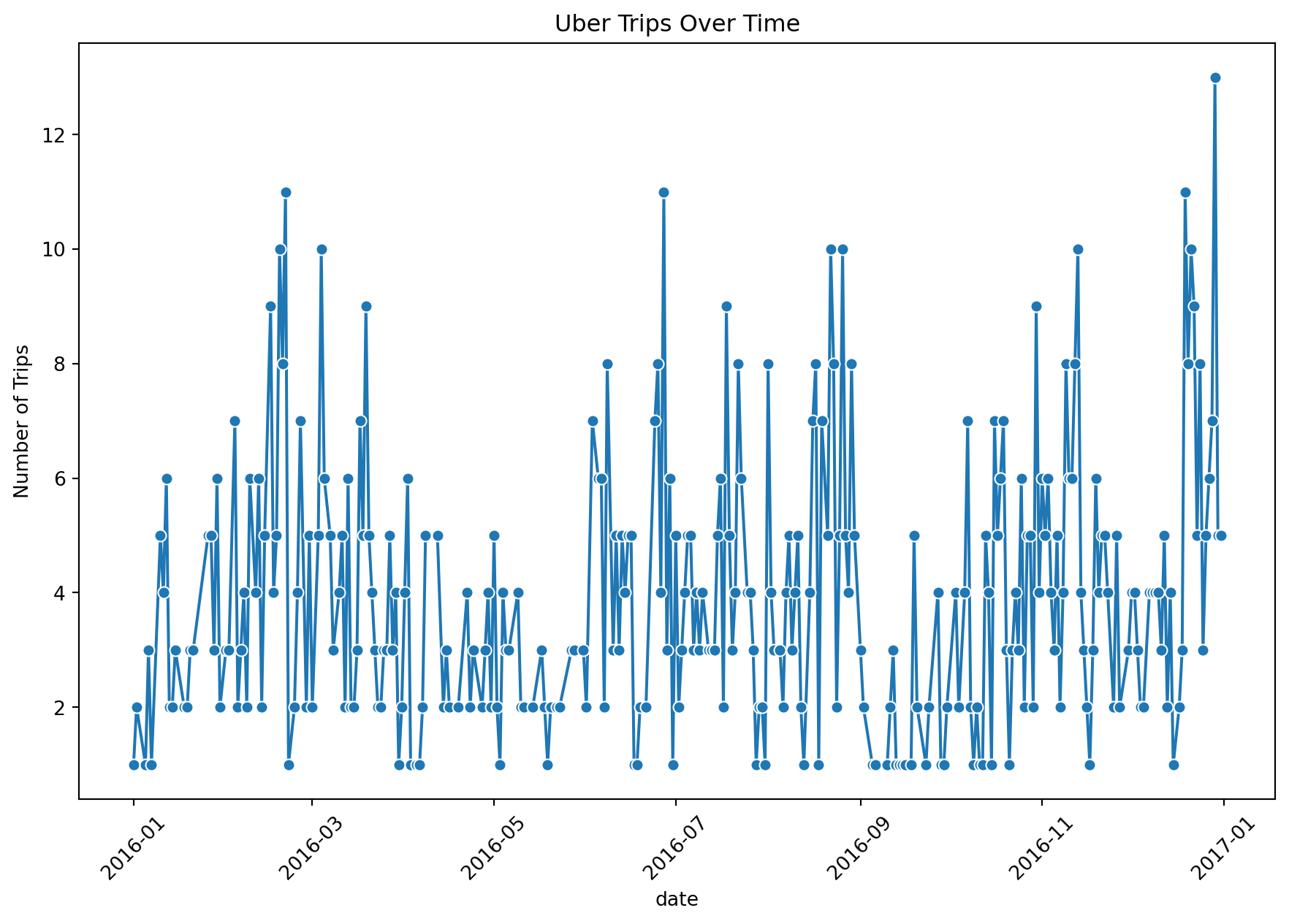
top_pickups = df["start"].value_counts().head(10)
top_dropoffs = df["stop"].value_counts().head(10)

fig, axes = plt.subplots(1, 2, figsize=(9, 3))

sns.barplot(x=top_pickups.values, y=top_pickups.index, ax=axes[0], palette="Blues_r", hue=top_pickups.index, dodge=False)
axes[0].set_title("Top 10 Pickup Locations")
axes[0].set_xlabel("Number of Trips")
axes[0].legend([],[], frameon=False)
sns.barplot(x=top_dropoffs.values, y=top_dropoffs.index, ax=axes[1], palette="Greens_r", hue=top_dropoffs.index, dodge=False)
axes[1].set_title("Top 10 Drop-off Locations")
axes[1].set_xlabel("Number of Trips")
axes[1].legend([],[], frameon=False)

plt.tight_layout()
plt.show()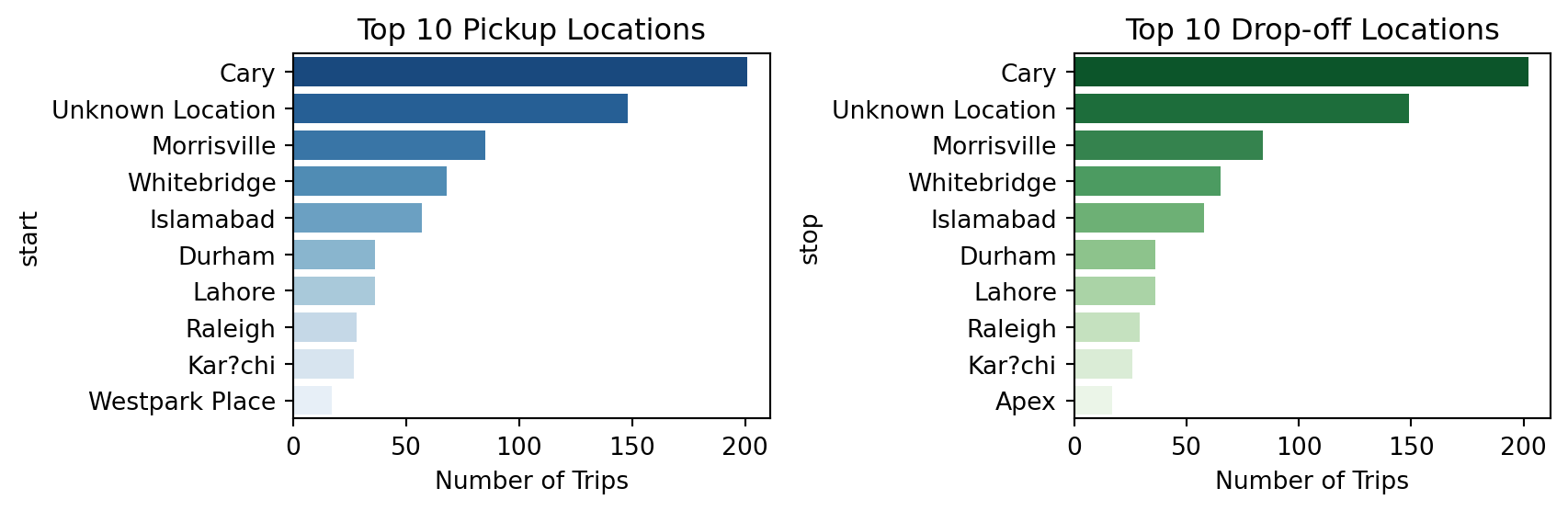
trip_purpose_counts = df["purpose"].value_counts()
plt.figure(figsize=(9, 5))
sns.barplot(x=trip_purpose_counts.index, y=trip_purpose_counts.values, hue=trip_purpose_counts.index, palette="Oranges", legend=False)
plt.xlabel("Purpose of Trip")
plt.ylabel("Number of Trips")
plt.title("Trip Purpose Distribution")
plt.xticks(rotation=45)
plt.show()

#Main purpose isn't known but second is a meeting which could be relative to commuting with commuting having little, below we see it has the highest average distance by purpose, which backs up our product in relation a student carpooling application which would aid in their commute.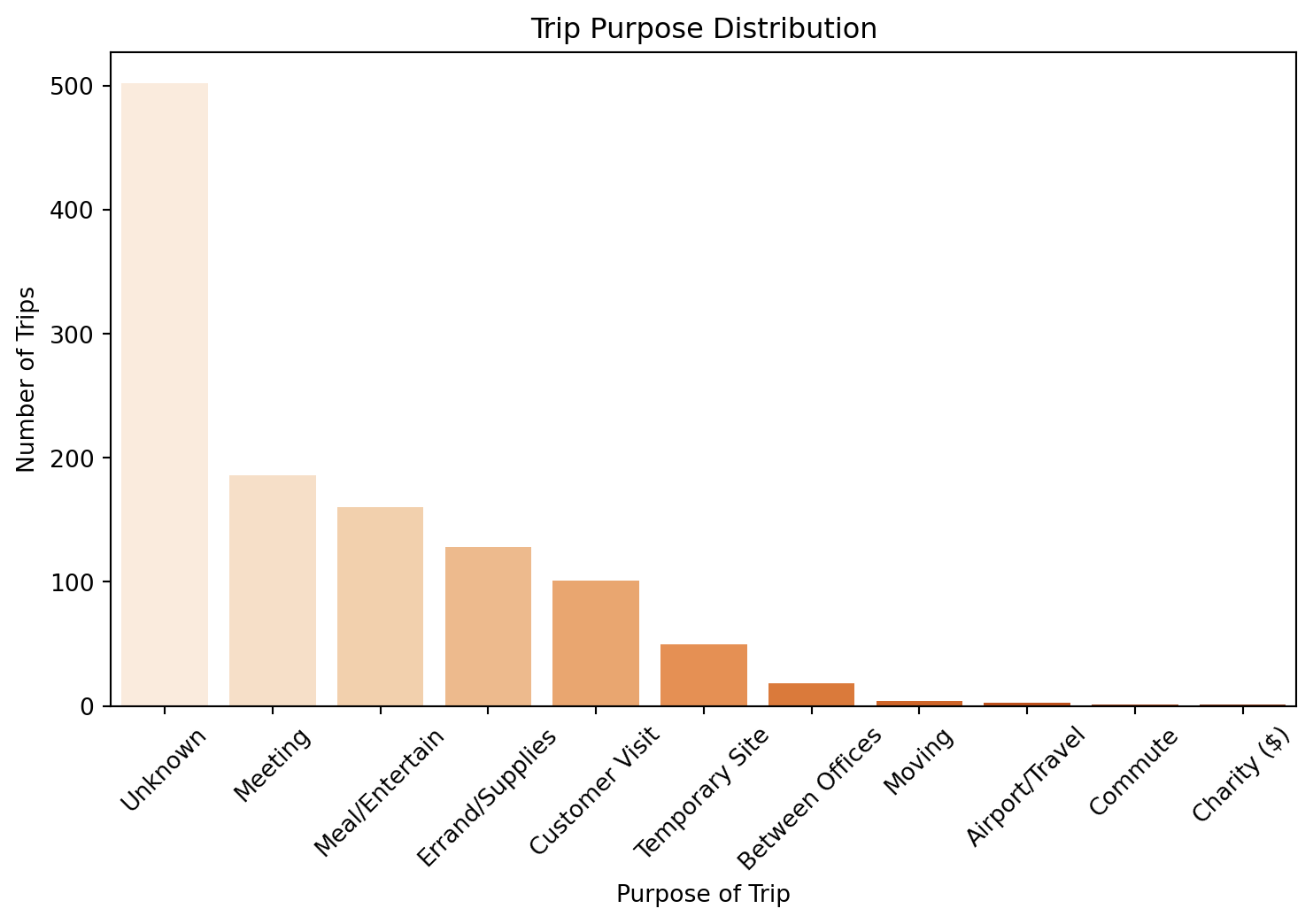
avg_miles_purpose = df.groupby("purpose")["miles"].mean().sort_values()
plt.figure(figsize=(9, 5))
sns.barplot(x=avg_miles_purpose.index, y=avg_miles_purpose.values, hue=avg_miles_purpose.index, dodge=False, palette="Blues", legend=False)
plt.xlabel("Purpose of Trip")
plt.ylabel("Average Miles Traveled")
plt.title("Average Trip Distance by Purpose")
plt.xticks(rotation=45)
plt.show()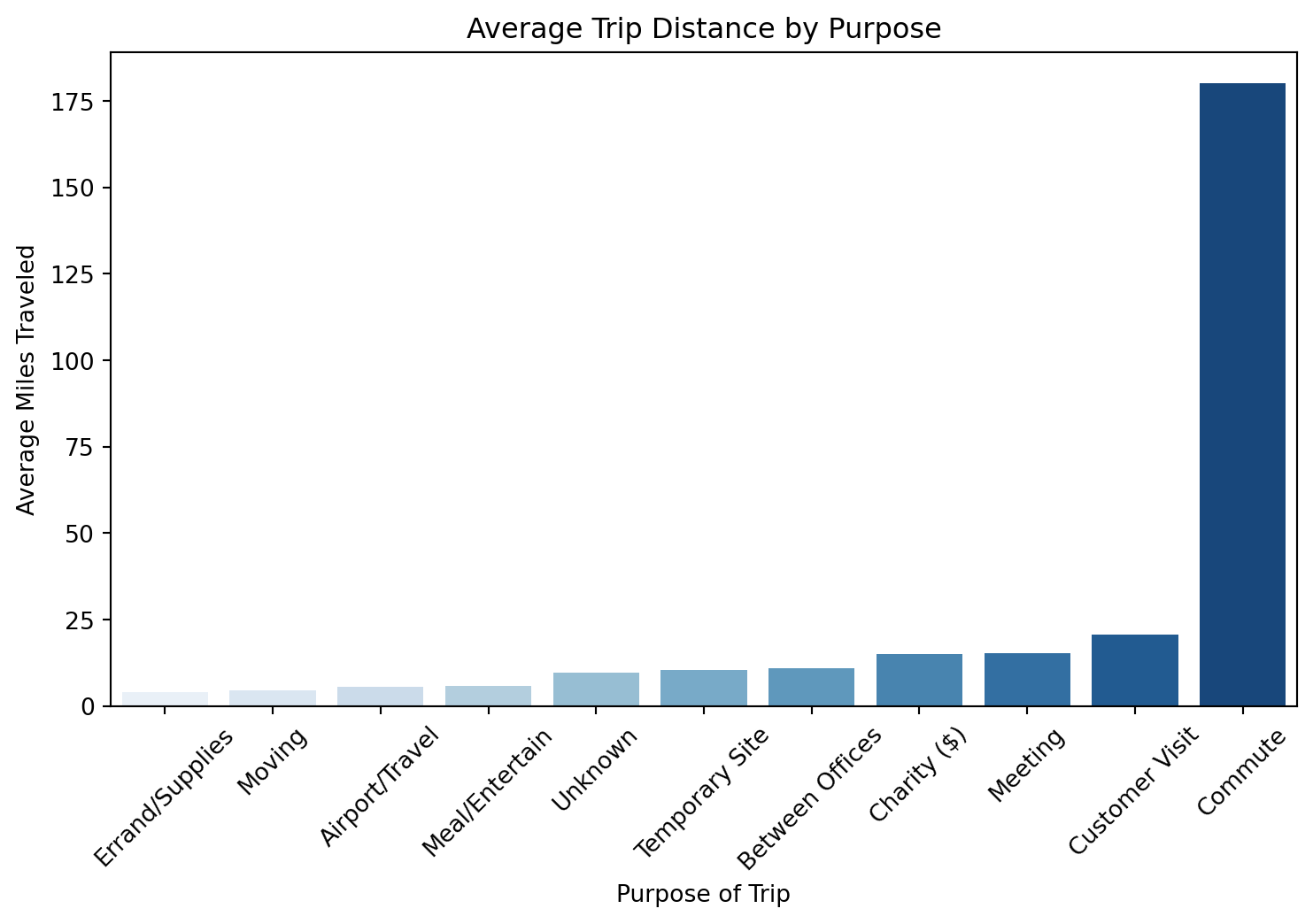
df["hour"] = df.index.hour
plt.figure(figsize=(9, 5))
sns.countplot(x=df["hour"], hue=df["hour"], dodge=False, palette="coolwarm", legend=False)
plt.xlabel("Hour of the Day")
plt.ylabel("Number of Trips")
plt.title("Trips by Hour of the Day")
plt.show()
#hours align similarly with college hours.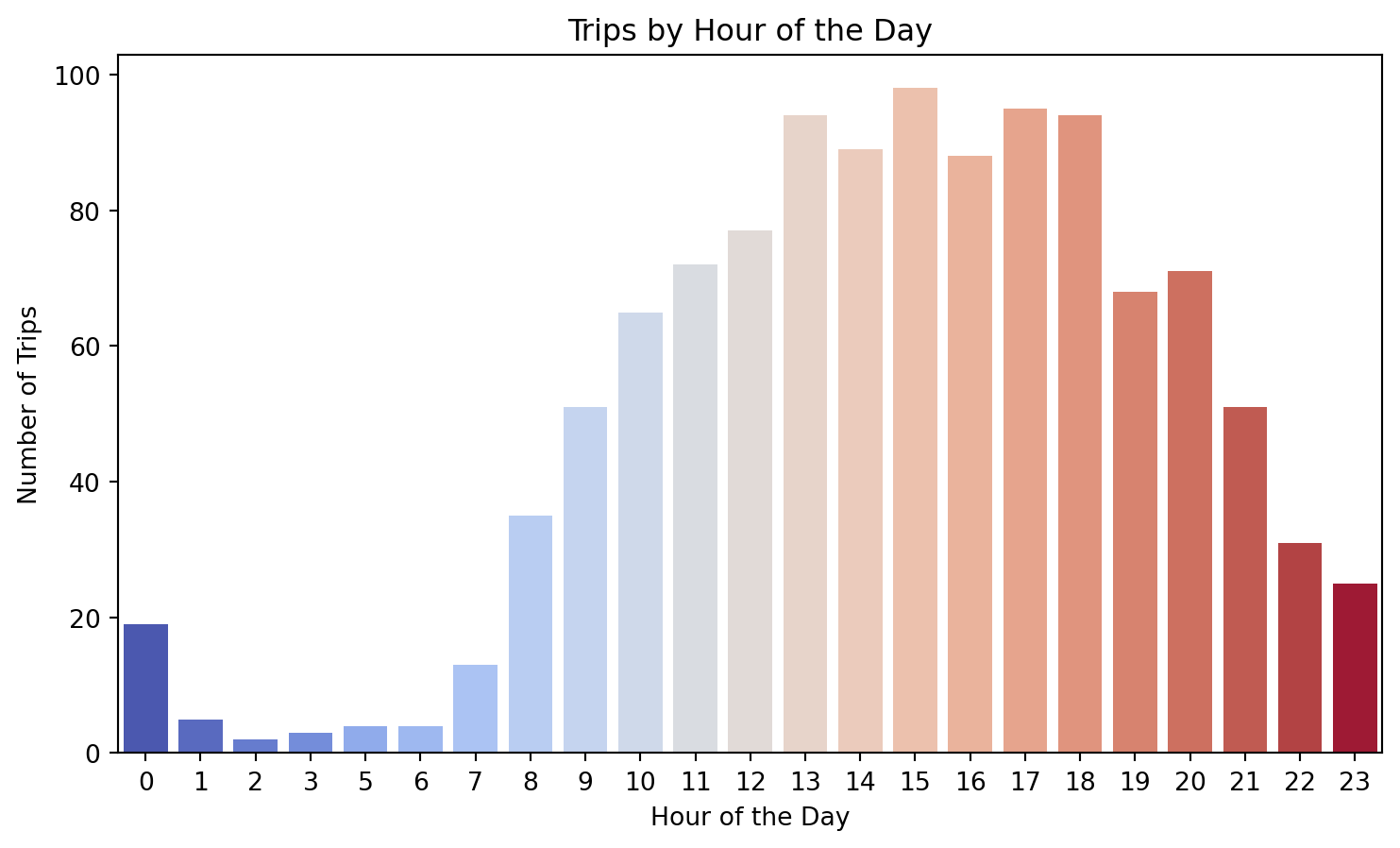
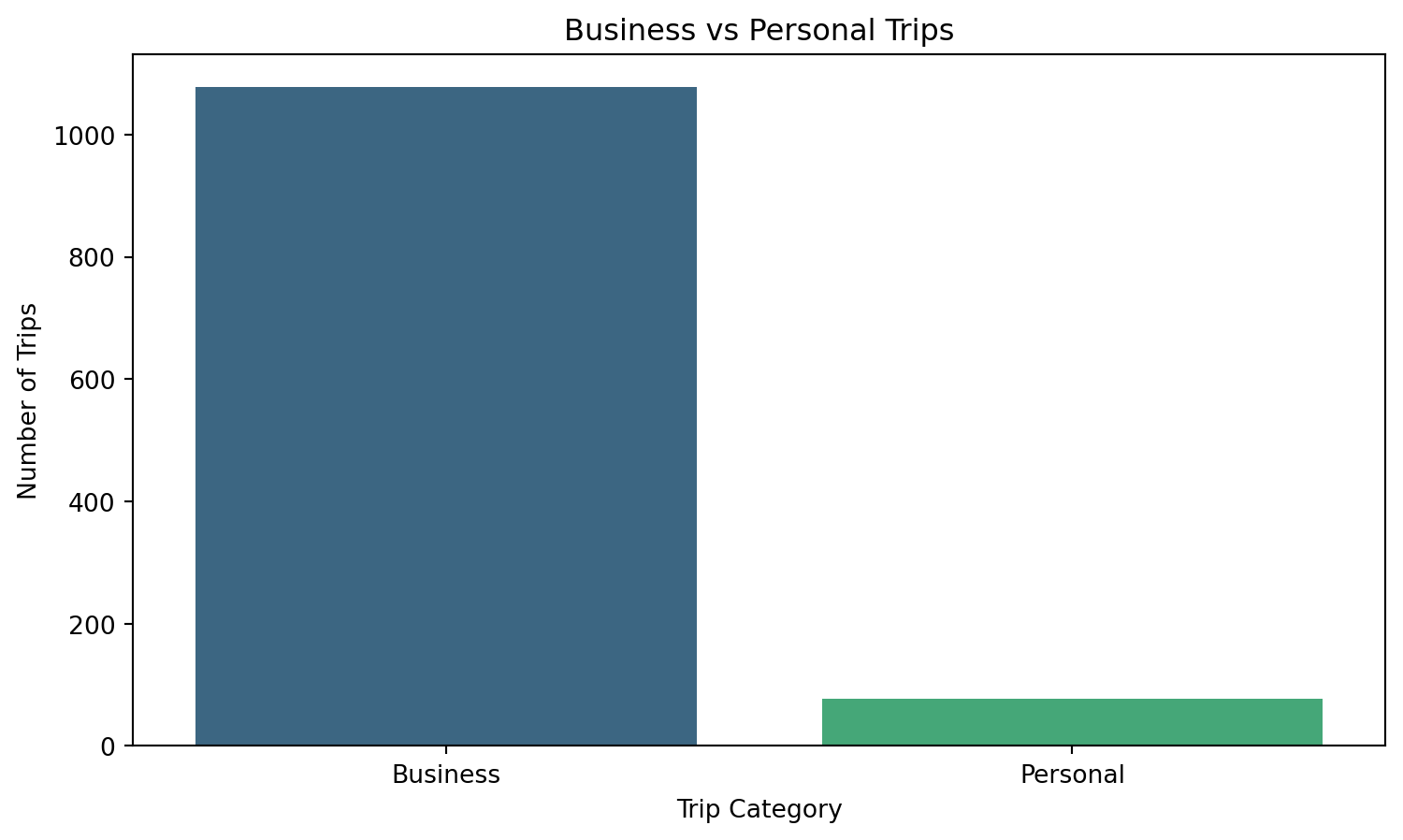
plt.figure(figsize=(9, 5))
sns.countplot(x=df["category"], hue=df["category"], palette="viridis", legend=False)
plt.xlabel("Trip Category")
plt.ylabel("Number of Trips")
plt.title("Business vs Personal Trips")
plt.show()